In this post we are going to see how to create a simple android application that contains two buttons and how to create the response for the button clicks.
Create a new android project named ButtonDemo in eclipse.
In the activity_main.xml add two buttons as shown bellow.
Now made the following changes in the MainActivity.java file which is on the package coming under the Src folder.
Save the project and run.
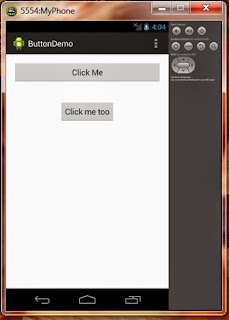

Create a new android project named ButtonDemo in eclipse.
In the activity_main.xml add two buttons as shown bellow.
 <RelativeLayout xmlns:android="http://schemas.android.com/apk/res/android"
   xmlns:tools="http://schemas.android.com/tools"
   android:layout_width="match_parent"
   android:layout_height="match_parent"
   android:paddingBottom="@dimen/activity_vertical_margin"
   android:paddingLeft="@dimen/activity_horizontal_margin"
   android:paddingRight="@dimen/activity_horizontal_margin"
   android:paddingTop="@dimen/activity_vertical_margin"
   tools:context=".MainActivity" >
   <Button
     android:id="@+id/button2"
     android:layout_width="fill_parent"
     android:layout_height="wrap_content"
     android:onClick="clickMeMethod"
     android:text="@string/first_button" />
   <Button
     android:id="@+id/bn"
     android:layout_width="wrap_content"
     android:layout_height="wrap_content"
     android:layout_below="@+id/button2"
     android:layout_centerHorizontal="true"
     android:layout_marginTop="39dp"
     android:text="Click me too" />
 </RelativeLayout>
Now made the following changes in the MainActivity.java file which is on the package coming under the Src folder.
 package com.buttondemo;
 import android.app.Activity;
 import android.os.Bundle;
 import android.view.Menu;
 import android.view.View;
 import android.view.View.OnClickListener;
 import android.widget.Button;
 import android.widget.Toast;
 public class MainActivity extends Activity {
      Button button;
      @Override
      protected void onCreate(Bundle savedInstanceState) {
           super.onCreate(savedInstanceState);
           setContentView(R.layout.activity_main);
           button = (Button)findViewById(R.id.bn);
           button.setOnClickListener(new OnClickListener() {
                @Override
                public void onClick(View v) {
                     // TODO Auto-generated method stub
                     Toast.makeText(getBaseContext(), "You click the CLICK ME TOO button", Toast.LENGTH_LONG).show();
                }
           });
      }
      @Override
      public boolean onCreateOptionsMenu(Menu menu) {
           // Inflate the menu; this adds items to the action bar if it is present.
           getMenuInflater().inflate(R.menu.main, menu);
           return true;
      }
      public void clickMeMethod(View v)
      {
           Toast.makeText(getBaseContext(), "You just click CLICK ME button", Toast.LENGTH_LONG).show();
      }
 }
Save the project and run.


Ads by Google
Comments
Post a Comment